About CCTV Installation Services
1. Planning is the Most Important Step (Site Survey)
- Make a complete map of the area. Mark all entry/exit points (main gate, doors, garage, driveway), blind spots, and high-value areas.
- Decide how many cameras you need and where to place them. Focus on choke points for maximum coverage with fewer cameras.
- Prefer PoE (Power over Ethernet) cameras - one cable handles both power and data, making wiring much easier and cleaner.
2. Correct Height and Angle of Cameras
- Height: Install cameras 8-10 feet (approx. 2.4-3 meters) above the ground. This gives a clear view of faces and prevents easy tampering.
- Angle: Tilt the camera 15o to 45o downward. Too high and you only see the top of heads; too low and faces may not be visible clearly.
- Never point cameras directly toward the sun - it causes glare and washed-out footage.
3. Best Placement Locations
- Front door, back door, and side entrances
- Garage and driveway
- Main gate and compound walls
- In shops/offices: Counter area, store room, and exit points
- Try to cover maximum area with each camera while keeping some overlap so no spot is missed.
4. Lighting and Night Vision
- Install cameras in areas with good lighting. Infrared (IR) lights work in darkness, but avoid reflection (IR light should not bounce back from walls or objects into the lens).
- Always choose waterproof cameras (IP65 or higher) for outdoor use.
5. Wiring and Power Supply
- PoE cameras are the best choice for clean and simple installation.
- Avoid sharp bends in cables. Keep them at least 12 inches away from high-voltage wires to prevent interference.
- Use a stable power supply and add a UPS backup so recording continues during power cuts.
- Protect outdoor wiring with conduit pipes or PVC channels.
6. Software and Settings
- Update the firmware of NVR/DVR before installation.
- Set proper recording schedule: Motion detection + continuous recording.
- Use strong, unique passwords - never leave default passwords.
- Set up remote viewing using secure cloud services or proper port forwarding.
7. Common Mistakes to Avoid
- Installing cameras too high or too low
- Blocking or reflecting IR lights
- Using indoor cameras outdoors
- Insufficient storage space (check HDD capacity properly)
- Pointing cameras toward neighbors' property (privacy issues)
- Skipping testing - always check footage quality in day and night after installation.
8. Pro Tips (2026 Updates)
- Follow DORI standards: Placement should support Detection --> Observation --> Recognition --> Identification.
- For wired systems, hire a professional installer if you are not experienced - small mistakes can become costly later.
- Regular maintenance: Clean dust regularly, keep firmware updated, and check HDD health monthly
1. Internet/Broadband/Leadline services
2. CCTV/Camera Installation and service
3. solar energy service and installation
4. Networking
5. Ac/cooler/freeze/fan/geyser repair/service and installation
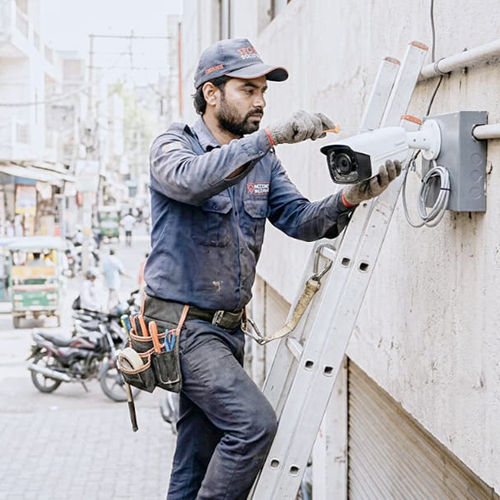
Why Choose Our CCTV Installation Services?As a manufacturer, supplier, and trader operating Pan India, we deliver efficient CCTV solutions for commercial, residential, and industrial spaces. Our certified technicians ensure compliance with ISI standards and government approvals, guaranteeing security and peace of mind. We provide on-site installation and customization, making us a trusted choice for varied security needs.
Expert Installation and Timely DeliveryOur services are conducted exclusively by certified professionals, ensuring each project meets the highest quality standards. With a promise of installation completion within 24-48 hours, your security needs are prioritized. Enjoy post-installation support and ongoing 24/7 assistance for a seamless experience.
Comprehensive Camera Selection and CustomizationWe support all major camera types, including Dome, Bullet, PTZ, IP, and Analog. Whether you require customized layouts or specific security solutions, our team assesses your premises and recommends the best system design during site inspection. All necessary materials and equipment are provided for every installation.
FAQ's of CCTV Installation Services:
Q: How does your CCTV installation process work in Pan India?
A: The installation process begins with a comprehensive site inspection by our certified professionals. We then supply all necessary materials, install the selected cameras, configure the system as per your requirements, and provide a demonstration. The entire process is completed on-site within 24-48 hours.
Q: What types of CCTV cameras can you install?
A: We install a wide range of CCTV cameras, including Dome, Bullet, PTZ, IP, and Analog camera types. Our services are suitable for commercial, residential, and industrial applications, ensuring security for all environments.
Q: When can I expect the CCTV installation to be completed after booking the service?
A: Typically, our team completes on-site installation within 24-48 hours of booking, depending on the project's complexity and site conditions. Our scheduling is flexible to accommodate your convenience.
Q: Where are your CCTV installation services available?
A: Our CCTV installation services are available Pan India, covering all major cities and regions. We provide on-site support to ensure quick and efficient service delivery wherever you are located.
Q: What is included in your post-installation support?
A: Our post-installation support covers troubleshooting, maintenance, system upgrades, and remote or on-site technical assistance. We offer 24/7 support to ensure your security system's optimal performance at all times.
Q: Can I customize my CCTV system installation according to specific needs?
A: Yes, customization is available based on your premises and security requirements. During the site inspection, our experts design a tailored CCTV layout and recommend suitable camera types and placements.
Q: What is the benefit of choosing your CCTV installation services?
A: By choosing our services, you benefit from quick installation by certified professionals, ISI-marked and government-approved equipment, full post-installation support, and service reliability. We ensure comprehensive security solutions for commercial, residential, or industrial spaces across India.




 Send Inquiry

 Send Inquiry
 Send Inquiry
 Send SMS